
Educate, Encourage, Empower
You can only improve on that which is measured.
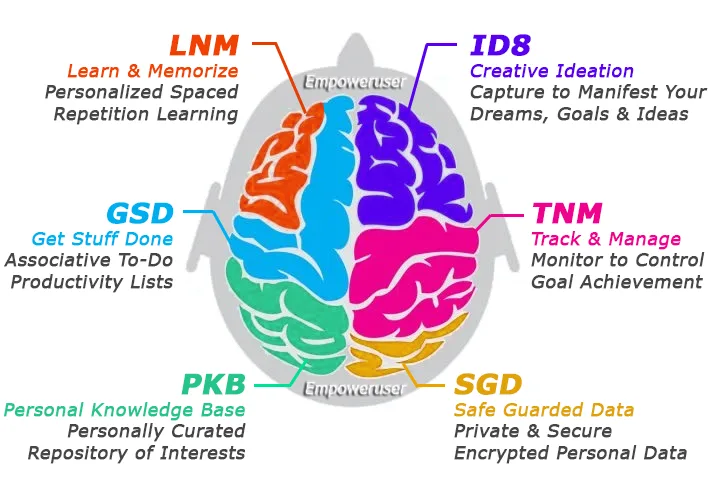
Empoweruser fosters improved decision-making and
prioritization prowess to maximize personal
effectiveness and professional throughput.
Clear your mind, capture epiphanies and organize mundane daily
tasks and errands to attain maximum performance throughput
while transforming your most personal aspirations into reality.
 1. Perfect for hyper-individualized busy-people, solopreneurs, fractional
CXO's, boot-strappers, indiepreneurs, freelancers and digital nomads.
2. Empowers users with the tools needed to be more proactive in exploring,
controlling and managing productivity to attain peak performance.
3. Enables users to raise the bar on their knowledge and learning retainment
by monitoring success via an achievement-based feedback loop.
4. Forces users to become super intelligent with facts and knowledge
specific to their goals, projects, work, interests and memorization desires.
5. Provides a custom, personal digital assistant
experience to help solve
problems and make progress towards achieving peak performance.
6. Amplifies a users natural strengths and talents by charting routine
efficiencies, key performance metrics and goal attainment progression.
7. Paramount Protection of the users identity, personality, privacy, thoughts, ideas and data.
Data sovergnity is of umpmost importance to our mission.
1. Perfect for hyper-individualized busy-people, solopreneurs, fractional
CXO's, boot-strappers, indiepreneurs, freelancers and digital nomads.
2. Empowers users with the tools needed to be more proactive in exploring,
controlling and managing productivity to attain peak performance.
3. Enables users to raise the bar on their knowledge and learning retainment
by monitoring success via an achievement-based feedback loop.
4. Forces users to become super intelligent with facts and knowledge
specific to their goals, projects, work, interests and memorization desires.
5. Provides a custom, personal digital assistant
experience to help solve
problems and make progress towards achieving peak performance.
6. Amplifies a users natural strengths and talents by charting routine
efficiencies, key performance metrics and goal attainment progression.
7. Paramount Protection of the users identity, personality, privacy, thoughts, ideas and data.
Data sovergnity is of umpmost importance to our mission.

To install this app on your iPhone or iPad:
